Hello and welcome to the Highland Ranch Educational Foundation’s Parent’s Night IN! Auction.
In order to ensure a smooth bidding process, please follow the steps below to register for an account on our website.
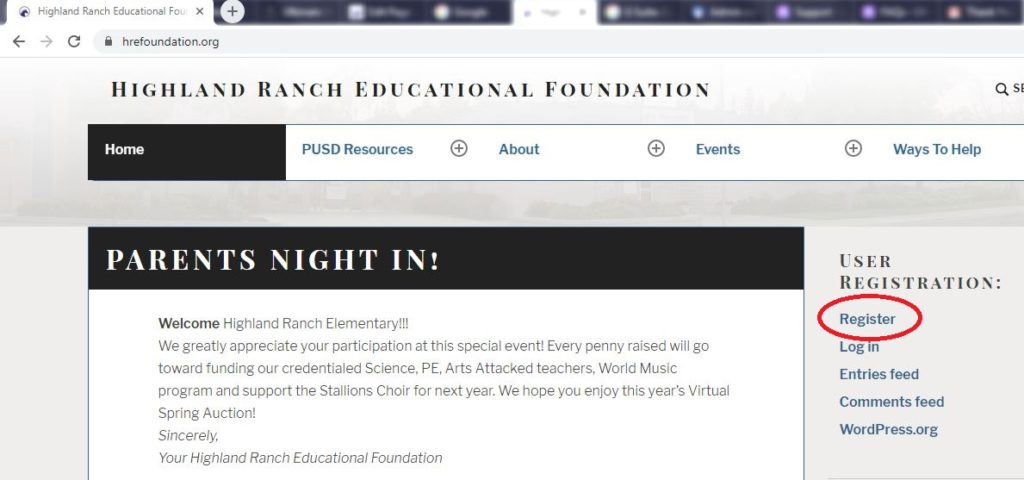
First – you’ll need to click “Register“. From a PC, scroll down just a bit on our Homepage, and the link will be on the right sidebar:
From a mobile device, you’ll need to scroll to the bottom of our Homepage:

Once you’ve registered, you will receive a link in your email to create your password:
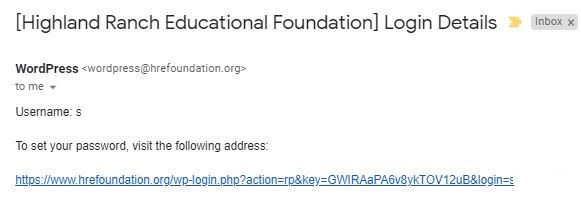
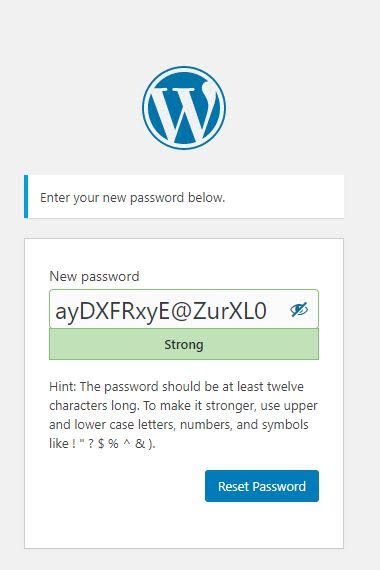
Click the first link shown, which will take you to the password screen, where you’ll enter your preferred password and click “Reset Password.”
NOTE: the box to type the password may appear tiny – we suggest opening an email/text file, type your password in there, and then copy/paste into the 2 password boxes.
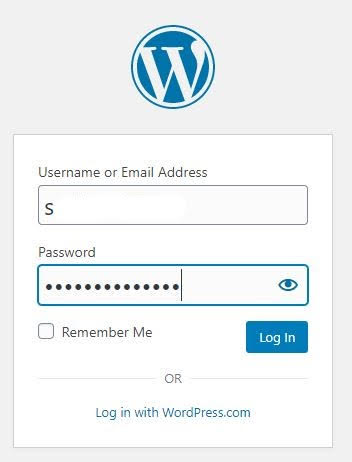
Your account should now be set up and you can log in to the HREF website!
The final step before you bid is to add your billing address (note that no payment information is stored – you will pay via Paypal OR via cash/check on delivery):
Now you’re all set to bid on our Parents’ Night IN! Auctions starting at 10am on Friday, May 15th. Happy bidding!